Article
Accessibility in digital information environments: perceptions and challenges for people with low vision
Acessibilidade em ambientes de informação digital: percepções e desafios para pessoas com baixa visão
 Rogério Ferreira Marques
Erica Fernanda Olimpio da Silva
Lilian Soares Outtes Wanderley
Maria Luciana de Almeida lucianalmeida.pe@gmail.com
Rogério Ferreira Marques
Erica Fernanda Olimpio da Silva
Lilian Soares Outtes Wanderley
Maria Luciana de Almeida lucianalmeida.pe@gmail.com
Accessibility in digital information environments: perceptions and challenges for people with low vision
Em Questão, vol. 32, e-146050, 2026
Universidade Federal do Rio Grande do Sul
Received: 12 March 2025
Accepted: 30 September 2025
Abstract: The study looks at accessibility in digital information environments from the perceptions of users with low vision and experts in the field, seeking to understand the challenges and propose improvements for digital inclusion. The methodological process takes a qualitative-quantitative approach, involving interviews with users with low vision and experts, as well as a technical analysis of the digital platforms. Five repositories were analyzed and the data collected was processed using content analysis, covering three main dimensions: technical evaluation, user perceptions and expert contributions. The results indicate that digital accessibility for people with low vision requires the integration of assistive technologies with institutional practices and collaborative strategies.
Keywords: Digital information environments, accessibility, low vision user.
Resumo: O estudo analisa a acessibilidade em ambientes digitais de informação a partir das percepções de usuários com baixa visão e especialistas na área, buscando compreender os desafios e propor melhorias para a inclusão digital. O processo metodológico adota uma abordagem qualiquantitativa, envolvendo entrevistas com usuários com baixa visão e especialistas, além de uma análise técnica das plataformas digitais. Foram analisados cinco repositórios e os dados coletados foram processados por meio da análise de conteúdo, abrangendo três dimensões principais: avaliação técnica, percepções dos usuários e contribuições de especialistas. Os resultados indicam que a acessibilidade digital para pessoas com baixa visão requer a integração de tecnologias assistivas com práticas institucionais e estratégias colaborativa.
Palavras-chave: Ambientes de informação digital, acessibilidade, usuário com baixa visão.
1 Introduction
Nowadays, information is disseminated, retrieved and accessed very quickly due to the advance of Information and Communication Technologies (ICT). These technologies provide benefits, autonomy and independence in the educational, professional, domestic, leisure and entertainment spheres for all segments of society (Sonza, 2008). However, making services and information available on the World Wide Web (WWW) is not enough. Not all users are able to access and use digital interfaces efficiently, which makes it difficult to access the information available. For some, it’s as if the available information didn’t exist. This highlights the emergence of new social demands regarding the digital and informational inclusion of People With Disabilities (PWD).
Information environments are the result of organizational environments focusing on information and knowledge. Digital information environments are like traditional environments, but they are inserted in the digital environment, and include systems, websites, portals, software, applications, among others. Despite the evolution of access to information provided by digital environments, accessibility for people with disabilities is still a challenging issue (Camargo, 2009; Hott; Cruz-Riascos, 2018). To consider digital accessibility is to recognize its importance and show that access to information for people with low vision, for example, differs substantially from access for users without disabilities.
The interest in accessibility and adapted tools arose from the aspiration to understand the potential elements to be incorporated into digital information environments. Thus, the aim of this research was to analyze accessibility in digital information environments according to established accessibility guidelines (WCAG 2.1); expert expertise; and the perspective of users with low vision. To this end, the following specific objectives were outlined: (a) identify the main characteristics of digital information environments, based on the WCAG 2.1 guidelines; (b) illustrate the perception of experts in relation to the platforms; (c) analyze how visually impaired people with low vision access and use the tools in these information environments.
Discussing accessibility implies reflecting not only on autonomy, but also on diversity, a fundamental aspect of human life. The barriers faced by people with disabilities range from physical and architectural obstacles to stigmas and stereotypes. The disparities are remarkable, and it is crucial to understand the nuances involved in the quest to make digital information accessible to everyone, regardless of their visual abilities.
2 The relationship between people with disabilities and assistive technologies
In order to understand how people with visual impairments perceive the world, it is essential to understand the concept of this condition. Visual impairment includes people with low vision and people who are blind, a condition that can be acquired or hereditary. Low vision, also known as amblyopia, low vision or residual vision, refers to a significant reduction in the amount of visual information an individual can receive from the environment. This restricts the amount of important data needed to construct knowledge about the outside world (Oliveira, 2017; Brasil, 2007).
A person is classified as blind when they have visual impairment in both eyes, resulting in the absence or very limited perception of shapes and light. Low vision is a visual impairment that affects the functioning of both eyes and cannot be corrected by conventional glasses, contact lenses or eye surgery. This condition results in a reduction in the functional capacity of vision, due to a combination of factors, which can include a decrease in visual acuity, which is the difficulty of seeing objects clearly, a significant reduction in the visual field, as well as cortical alterations and/or contrast sensitivity (Lourenço et al., 2020).
Resources and methods developed to help people with visual impairments in their daily lives are used, including Assistive Technologies - ATs, such as screen reader programs that allow blind people to browse the internet using the keyboard instead of the mouse and access information via speech synthesizers or Braille displays. The use of these technologies is important to ensuring digital inclusion and equal access to information for people with visual impairments (W3C, 2018a).
The term assistive technology was proposed by Sassaki (1996) and defined as anything that assists or helps people with disabilities. A decade later, the Technical Aids Committee (CAT) (Brasil, 2006) was established in Brazil, which presented the concept of Assistive Technology as an area of knowledge that encompasses products, resources, methodologies, strategies, practices and services, seeking to “[…] promote the autonomy and independence of people with disabilities, thus generating quality of life and social inclusion” (Brasil, 2009, p. 20).
3 Digital accessibility in the context of the World Wide Web
Interaction with the digital environment is strongly linked to vision. Several international documents establish accessibility guidelines and standards for the web, many of which provide practical examples. All these documents are based on the guidelines of the World Wide Web Consortium (W3C). The main objective of the web accessibility guidelines is to make online content accessible to all users of the World Wide Web, with the aim of ensuring digital inclusion and providing an equal and efficient browsing experience for everyone who uses the internet (W3C, 2018b).
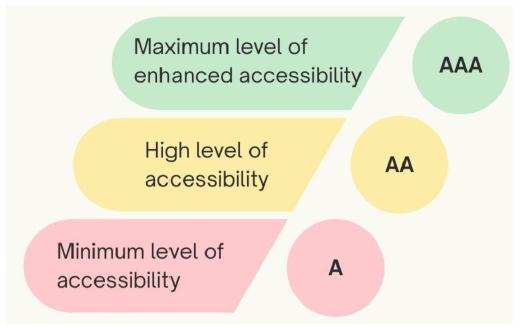
Figure 1
Levels of compliance within WCAG 2.1
Source: Based on W3C (2018b).
In addition to the guidelines and success criteria, there are informational techniques divided into two categories: “required”, which meet the success criteria, and “suggested”, which go beyond what is required by the success criteria. However, it is important to note that the guidelines do not address all the needs of all users with these disabilities (W3C, 2018a).
4 Methodological procedures
By taking as its investigative focus the analysis of the accessibility of digital environments for users with low vision, the research seeks to understand the subject using a mostly qualitative approach, supported by quantitative data. This methodological choice combines the analysis of data obtained by multiple collection instruments, providing a comprehensive and detailed view of the phenomenon studied.
In accordance with the guidelines established by the National Health Council (CNS), which regulates research involving human beings in Brazil, the study was submitted to and approved by the Research Ethics Committee of the Federal University of Pernambuco, which reflects the study’s commitment to scientific and ethical integrity.
The analysis was carried out in three dimensions:
-
a) digital information environments, including three institutional repositories, a university library website and the Minha Biblioteca e-book platform;
-
b) specialists in digital environments, one representing each region of Brazil, with attention to the country’s particularities and regional characteristics; and;
-
c) users with low vision who access the environments investigated, in order to understand their experiences.
The environments analyzed were the digital repositories of the Federal Universities of Paraíba (UFPB, 2025); Pernambuco (UFPE, 2019); and Rio Grande do Norte (UFRN, c2025); the website of the UFPB Central Library (UFPB, 2024), selected for its ease of access and use, considering that one of the researchers is a member of this library system, and the Minha Biblioteca (2024) platform, a national repository with a multidisciplinary collection of e-books widely used by higher education institutions in Brazil.
The selected digital environments were analyzed using the AccessMonitor tool, which follows the criteria of the Web Content Accessibility Guidelines (WCAG). The tool carried out automated checks on parameters such as contrast, readability, alternative descriptions for images and compatibility with assistive technologies, identifying compliance and non-compliance. For all environments, AccessMonitor generated detailed compliance reports, classifying errors by type and severity. This evaluation made it possible to map accessibility levels and propose improvements, especially in the retrieval of academic documents.
In order to understand the effectiveness of accessibility in digital information environments for users with low vision, semi-structured interviews were carried out with five specialists, one from each region of Brazil, who work in the area of digital environments and hold coordinating positions in regional digital repository networks. This allowed regional and institutional perspectives to be considered in the analysis. The interviews took place remotely, using the National Research Network (RNP) platform, between March 12 and April 25, 2024, with an average duration of one hour per meeting. The experts were identified as E1, E2, E3, E4 and E5 to preserve their anonymity. All of them are women and have between two and 15 years’ experience in the field. The interviews covered specific issues, recommended practices, the influence of international guidelines (such as WCAG 2.1) and the impact of assistive technologies in educational and information environments.
The interviews with experts were analyzed according to the precepts of Bardin’s (2011) content analysis. The process included: pre-analysis with initial reading for familiarization and definition of categorization criteria; exploration of the material with coding and segmentation into thematic units; and treatment of the results with interpretation of the categories in the light of the research objectives. The categories identified were: accessibility challenges: technical and structural difficulties, such as the lack of standardization; the importance of assistive technologies: the need for compatibility with screen readers and magnification tools; institutional policies: the relevance of institutional strategies to guarantee accessibility; user feedback: user participation as essential for continuous adjustments; continuous training: team training on accessibility practices and guidelines; good practices: examples of intuitive interfaces and improved support as models; and standards and guidelines: barriers to applying the WCAG due to technical and budgetary limitations.
Collecting data from users with low vision was a crucial step in understanding how these individuals interact with digital information environments. For this phase, questionnaires were distributed to a total of 82 users registered at the universities participating in the study, specifically, 43 users from UFPB, 12 from UFPE and 27 from UFRN. However, only 7 of the 43 invited users from UFPB; 6 of the 12 invited users from UFPE; and 5 of the 27 users from UFRN responded. Thus, the total number of responses was 18 participants.
This low participation reflects specific challenges faced during data collection, especially due to the university strike that was underway at the time. This strike affected the regular functioning of universities, making it difficult to access users and communicate with them to encourage them to participate. To overcome these difficulties and try to increase the number of responses, the use of online communications was intensified, using emails and social networks to reach users and explain the relevance of the research, seeking to motivate them to participate. However, this approach faced limitations, as not all participants had easy access to devices or support to respond to the questionnaires remotely.
The data obtained were analyzed quantitatively, in Excel, using descriptive techniques, including calculations of means, proportions and frequencies, allowing for the summary of characteristics and behaviors of the participants.
Data triangulation was performed to enrich the analysis. This approach provided a more comprehensive understanding of the topic, highlighting the main elements that influence digital accessibility for users with low vision in digital information environments.
5 Analysis of results
The section 5, regarding the analysis of results, addresses the accessibility of digital information environments from different perspectives. Subsection 5.1 details the technical evaluation of the UFPE, UFRN, and UFPB platforms in compliance with W3C guidelines. The focus is on the functionalities of these tools, the accessibility challenges, and the impact they have on access to information and knowledge production. In subsection 5.2, the discussion is deepened by bringing in the perceptions of experts in the field, who address systemic challenges, the need for institutional policies, the implementation of good practices, and the need for user feedback. The subsection 5.3 presents an analysis of the sociodemographic profile and usage patterns of the users with low vision themselves, offering a direct perspective on how they interact with these digital environments.
5.1 Digital information environments according to W3C guidelines
The website of the Institutional Repository of the Federal University of Pernambuco obtained a score of 8.3, with only two practices not complying with level A. It was found that there are four images on the page that do not have the necessary alternative textual equivalent, which characterizes a failure in relation to accessibility guidelines, specifically about the provision of text alternatives for graphic content. The lack of textual descriptions prevents assistive technologies, such as screen readers, from identifying the images or conveying their purpose to visually impaired users.
The Institutional Repository of the Federal University of Rio Grande do Norte (UFRN) obtained a score of 6.5, which identified seven unacceptable practices related to accessibility. Thus, six practices were classified as level A and one as level AA. Regarding the lack of textual alternatives for images, an image was identified on the page without the necessary alternative textual equivalent. This failure compromises users with low vision who depend on assistive technologies, such as screen readers.
The website of the Institutional Repository of the Federal University of Pernambuco obtained a score of 8.3, with only two practices not complying with level A. It was found that there are four images on the page that do not have the necessary alternative textual equivalent, which characterizes a failure in relation to accessibility guidelines, specifically about the provision of text alternatives for graphic content.
The Institutional Repository of the Federal University of Rio Grande do Norte (UFRN) obtained a score of 6.5, which identified seven unacceptable practices related to accessibility. Thus, six practices were classified as level A and one as level AA. Regarding the lack of textual alternatives for images, an image was identified on the page without the necessary alternative textual equivalent. This failure compromises users with low vision who depend on assistive technologies.
A level AA practice was identified: the contrast ratio between text and background was below the minimum value allowed by WCAG guidelines. Failure to meet these criteria makes it difficult for users with low vision to read. Similarly, the language attribute was not identified in the page’s HTML code, which according to W3C guidelines, the absence of this attribute prevents speech synthesizers from automatically adjusting pronunciation and syntax to the language of the content, resulting in incorrect pronunciation and confusion for users.
Regarding duplicate ID attributes, elements with the same ID attribute value were found on the page, this attribute, by definition, must be unique in an HTML page. Assistive Technologies, such as screen readers, depend on a correct HTML structure to function properly. In this way, duplication compromises the expected functioning and hinders user navigation. It is worth noting that two links were identified without an accessible name, i.e., they did not have descriptive texts that clearly indicated their purpose. An accessible name is essential to help users of screen readers or assistive technologies understand the destination of the links.
The Institutional Repository of the Federal University of Paraíba (UFPB) received an overall score of 8.5. Four unacceptable practices were identified, three of which were level A and one was level AA. The first unacceptable practice identified was the inappropriate use of the “title” attribute, which was limited to repeating the same text present in the link. This “title” attribute should be used to provide additional information to the link text, both of which are sufficient to clarify the purpose of the link.
The second unacceptable practice was the absence of structured headings, which is why accessible web pages should present a hierarchical structure of headings to facilitate navigation and understanding of the content by visually impaired users. Heading markup allows screen readers to identify, announce and navigate the text efficiently, using hierarchical levels. In addition, assistive technologies that adjust the visual presentation can use these marks to create appropriate alternative displays. Regarding incorrectly positioned visual elements, an element was reported that was not visible or was incorrectly positioned. The lack of adequate positioning can compromise accessibility, especially for those who use screen readers.
The fourth unacceptable practice was color combinations with low contrast, classified as level AA. These are essential to ensure readability for people with low vision, promoting greater accessibility in digital environments. In view of this, these failures highlight the need for improvements in the UFPB institutional repository, so that they fully meet the accessibility guidelines, providing a more inclusive experience for all users.
In the digital environment of the Central Library of the Federal University of Paraíba (UFPB), were identified ten unacceptable practices (nine level A and one level AA). In summary, two images without alternative text and one image with an inappropriate “Alt” attribute were found. This attribute must provide text that can completely replace the image without loss of information or functionality. Otherwise, the attribute fails to meet accessibility guidelines for text alternatives, and thus prevents assistive technologies from identifying or conveying the purpose of the images to users with low vision.
Another unacceptable practice was the inappropriate use of the “title” attribute in links. Regarding focus removed by JavaScript, six cases were identified in which the focus of fields was removed by JavaScript, making the content inaccessible to users who rely exclusively on the keyboard to navigate. The color combinations with low contrast with level AA appeared in 13 color combinations that did not meet the minimum contrast required by the Web Content Accessibility Guidelines (WCAG). In addition, the absence of the language attribute on the page (lang) impairs the functioning of assistive technologies, such as speech synthesizers. This absence results in inadequate pronunciation and makes it difficult for users with visual impairments to understand the text. Subsequently, 11 links without adequate or clear descriptions were identified, making it difficult for users to understand the purpose or destination of the links.
In the analysis of the Minha Biblioteca digital e-book platform, seven inaccessible practices were identified, classified as: Five at level A; one at level AA; and one at level AAA. The first inaccessible practice is in relation to an image without an alternative text equivalent, which was identified without the necessary description in the “alt” attribute. Consequently, a link with empty content was identified as consisting only of an image whose alternative text equivalent is empty, which makes the link inaccessible, since assistive technologies cannot identify or transmit its purpose.
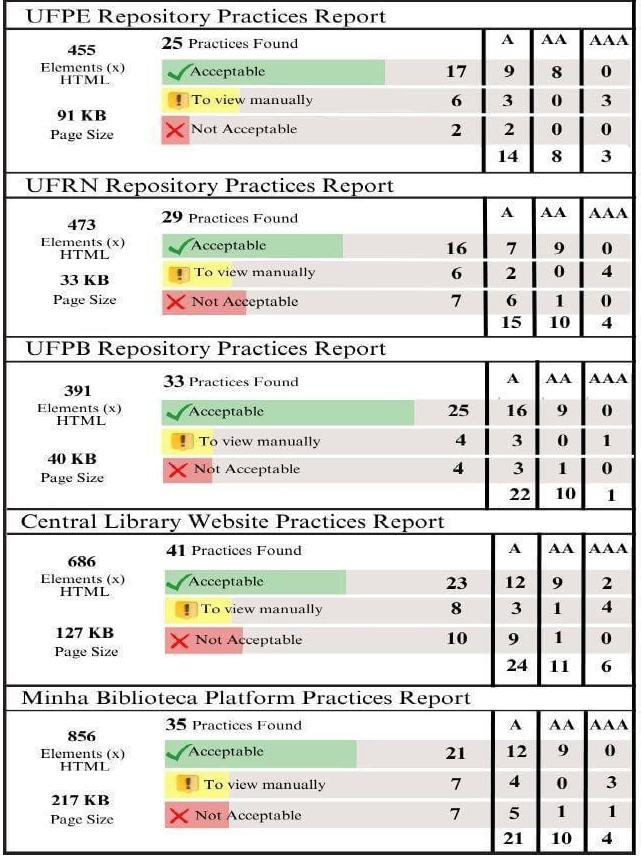
Figure 2
Digital information environments according to W3C guidelines
Source: Resource data.
It should also be noted that three cases of violation of the hierarchical sequence of headings were identified. These inadequate hierarchical structures compromise navigation and understanding of content, since screen readers depend on the correct order of headings to present text in a clear and organized manner. These practices limit the inclusion of people with visual impairments in the digital e-book platform Minha Biblioteca, and it is essential to correct these flaws and align the digital environment with international accessibility standards.
Figure 2 presents a summary of the digital information environments according to the W3C guidelines.
5.2 Experts’ perceptions regarding platforms
Regarding accessibility challenges, experts report that despite significant advances in the last decade, digital inclusion still faces complex and persistent challenges, compromising equitable access to the benefits of the digital age. Based on the perceptions obtained by the group of experts, it is possible to identify crucial aspects about accessibility in digital environments, to which all interviewees emphasized that, despite significant initiatives and efforts in accessibility, practical application in digital environments remains slow and faces many obstacles. Much of these difficulties stem from the inadequacy of systems, websites, and applications to efficiently meet the needs of people with low vision. This problem is reinforced by Gomes (2023, p. 1), who states that “[…] society has become increasingly aware of the relevance of inclusion and equal rights for people with disabilities”.
Technological evolution advances towards making life more accessible and practical. In this context, Assistive Technologies have as their main objective to promote greater independence, social inclusion, and quality of life for people with disabilities. This same topic is discussed by Cook e Polgar (2014), who highlight the creation of several methodologies to assist visually impaired people in their daily lives. Based on reports from five experts, three of them highlighted the essential role of Assistive Technologies, mentioning tools such as screen readers, virtual keyboards, responsive design, image descriptions, video captions and the use of color palettes with adequate contrast.
The Need for Institutional Accessibility Policies with the aim of ensuring that people with disabilities have access to equal opportunities, physical means, transportation, information and communication, including information and communication systems and technologies, as well as other services and facilities open to the public or for collective use. In view of these considerations, the growing discussion and concern about the inclusion of people with disabilities is notable. The experts affirm and emphasize the importance of institutions implementing and promoting accessibility policies, ensuring that everyone is aware and that inclusion is a natural and institutionalized practice. In this sense, Resende e Vital (2008, p. 1) also discuss the topic by stating that: “[…] the promotion of accessibility is the means that will give PwD the opportunity to participate fully in society, on equal terms with others”. In the context of institutions, these policies play an essential role in ensuring that people with disabilities or visual limitations can fully participate in digital, educational, cultural and professional environments.
User feedback is an essential element in the process of developing and improving services, products and environments, especially in the context of digital accessibility. By listening to and considering users’ real experiences, institutions can identify flaws, understand specific needs and implement improvements that really make a difference in usability and inclusion. Experts point out that the direct involvement of users with low vision is essential to identify limitations and propose improvements in digital systems; they offer valuable insights that can guide the development of more accessible and functional tools.
Continuing education should not be based on a rigid and institutionalized curriculum, but rather on a curriculum that is constantly being developed, open and aligned with the demands of continuous professional development. According to Fusari (2001), continuing education can be defined as that which occurs in and from the workplace. Its central axis is critical reflection, which should be fostered by professional experience and the knowledge derived from it. The experts interviewed emphasize the importance of ongoing training and awareness to ensure that teams are prepared and committed to implementing accessible practices in digital environments.
Good practices in digital accessibility reflect the commitment of some institutions to make their digital environments more inclusive, but also suggest the need to expand these practices to other platforms in order to ensure full accessibility. The experts highlight relevant initiatives in different institutions, illustrating the ongoing effort to promote digital inclusion. However, despite these exemplary initiatives, a significant gap remains, in which many platforms still do not fully implement accessibility practices, which limit the scope of this inclusion.
5.3 Users with low vision in digital information environments
The data analyzed provided an important initial overview, allowing us to understand the profile of the respondents, in addition to identifying possible influences of sociodemographic characteristics on perceptions about digital accessibility. A priori, the data collected were about the age range of users with low vision, according to the sample, at the Federal University of Pernambuco (UFPE) and at the Federal University of Rio Grande do Norte (UFRN), the age range is between 16 and 26 years old, which indicates that users of these institutions tend to be younger. This age concentration may reflect greater familiarity and dependence on digital technologies among the young public. On the other hand, the Federal University of Paraíba (UFPB) has a more diverse age distribution, with a significant number of users also in the 27 to 53 age range. This age diversity suggests that the institution’s digital environment serves a broader audience, encompassing the youngest.
Another point analyzed was the gender of the interviewees, with the majority of respondents at UFRN and UFPE being female. At UFPB, on the other hand, there is a predominance of males, although the difference is less pronounced. Regarding the level of education, it was identified that the respondents at UFPE are mostly undergraduates, which may indicate that the institution serves, for the most part, a public at the beginning of their academic training. This predominance suggests a concentration of users with expectations more focused on accessibility and agility in digital resources, fundamental aspects to support undergraduate activities. On the other hand, at UFPB, the distribution of respondents is more diverse, covering both undergraduate and graduate students. This diversity of profiles points to the need for UFPB’s digital environment to meet broader and more complex demands, from basic resources to support learning to advanced functionalities aimed at academic research and scientific production.
In this new stage, the perceptions of users with low vision regarding digital accessibility were addressed. Figure 3 shows that most participants reported accessing digital environments daily, with emphasis on UFRN, where all respondents indicated a daily frequency of access. This high rate at UFRN reflects a significant integration of digital technology in users’ daily lives, possibly motivated by a constant dependence on information resources for academic and professional activities. Thus, daily practice also suggests that UFRN users have a continuous demand for fast and updated information, which makes digital accessibility a crucial priority for the institution.
In comparison, although the frequency of daily access at other universities is also high, the total number of daily accesses at UFRN reinforces the importance of maintaining functional, intuitive and easy-to-navigate platforms. These measures are essential to ensure a satisfactory experience for users who depend on these resources as an integral part of their routines. Therefore, institutional policies aimed at maintaining and constantly updating accessibility are essential, aiming to meet the needs of this highly connected and demanding public.
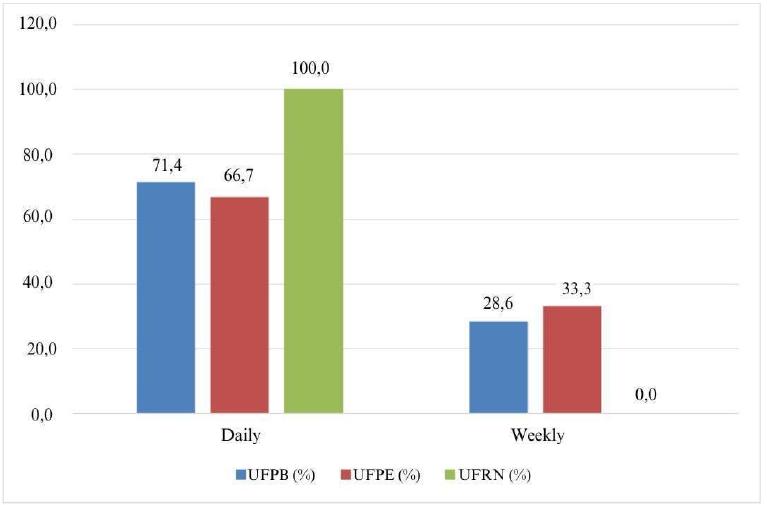
Figure 3
Frequency of access to digital environments
Source: Resource data.
Access to the Institutional Repository (IR), as shown in Figure 4, shows significant variations among the universities analyzed. At UFPB, there is a balanced distribution between users who access the IR sporadically and those who do so frequently. This pattern indicates that the repository has a diverse user base, who seek academic information with varying degrees of intensity. This usage dynamic may reflect both quick consultation and more frequent research, possibly carried out by students and researchers who see the IR as a reliable source of academic data.
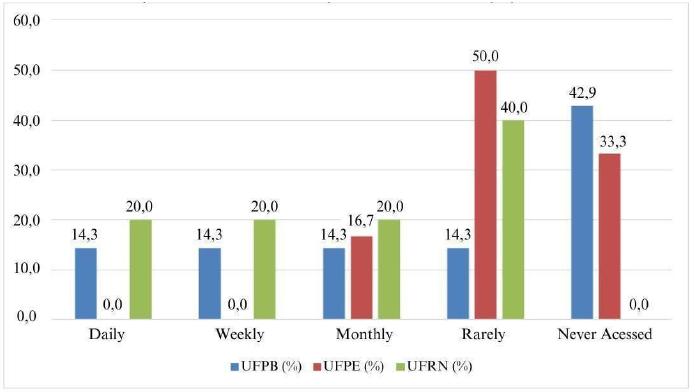
Figure 4
Frequency of access to the Institutional Repository
Source: Research data.
In contrast, at UFPE, most respondents reported rarely accessing the institutional repository. The data may indicate a lower integration of the IR into daily academic activities or a possible lack of incentive or familiarity with the platform on the part of users. The low frequency of access may suggest the need for institutional strategies aimed at promoting the repository, highlighting its advantages and adapting its functionalities to make it more attractive and accessible to the academic public.
Access to the Minha Biblioteca e-book database, shown in Figure 5, is notably low among respondents, with a significant number of participants from UFPE and UFRN indicating that they had never used the platform. These data suggest an underuse of the resource, possibly caused by a lack of knowledge about its content and benefits, or by the absence of institutional incentives to promote the use of the platform.
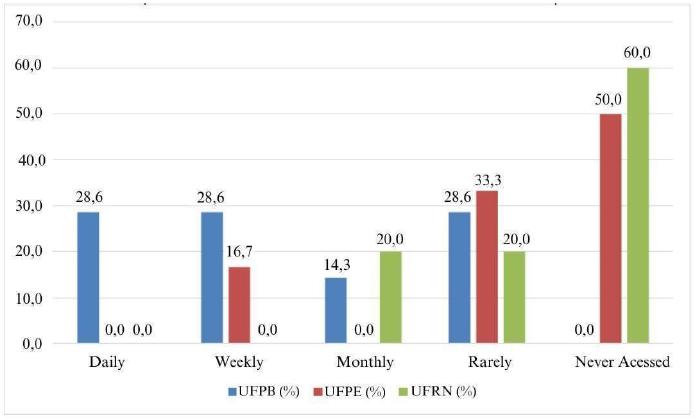
Figure 5
Frequency of access to the My Library database
Source: Resource data.
This underutilization also points to a strategic opportunity, since universities can invest in actions that promote and clarify the value of Minha Biblioteca as a digital resource. Some initiatives such as training, workshops and information campaigns could increase the visibility of the platform, highlighting features such as e-book accessibility and support for mobile devices. By encouraging the use of the database, institutions would have the potential to expand access to information and strengthen academic support, benefiting both students and faculty.
Figure 6 reveals that UFPB stands out for presenting the highest frequency of weekly access to the library website, which suggests that users of this institution perceive the website as a useful tool that is integrated into their academic routines. This pattern of frequent use may indicate the effectiveness of the website in meeting the information needs of students and researchers, possibly through updated resources, accessible features and a user-friendly interface that encourages users to return.
On the other hand, at UFPE and UFRN, a significant portion of respondents said they had never accessed the library website. According to the data, this may signal a disconnect between the website and the target audience of these institutions, perhaps due to a lack of efficient advertising, the absence of attractive features, or the perception that the website does not offer relevant or accessible resources for academic support.
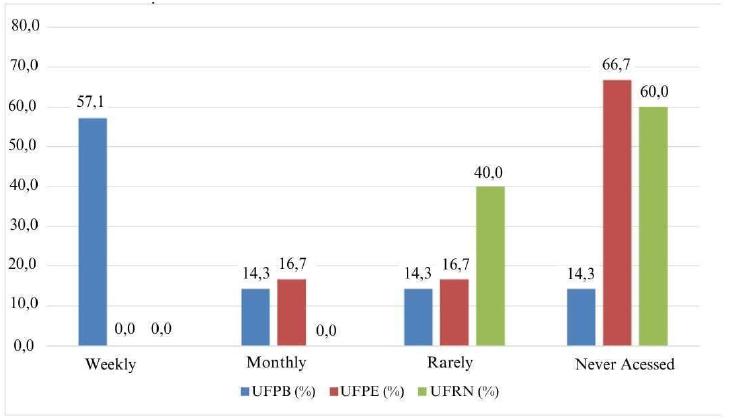
Figure 6
Frequency of access to the Central Library website
Source: Resource data.
With this, initiatives aimed at promoting and improving the website can make it a more present and indispensable tool in the academic routine of these institutions. Similarly, Figure 7 addresses the main devices used to access digital information, highlighting the smartphone as the most used in all the institutions analyzed, followed by the notebook, while in relation to tablets and desktop computers, the frequency of use is lower. Observing the data from UFPB, for example, 85% of users reported using the smartphone to access digital information, while at UFPE and UFRN this percentage reaches 100%; this information reinforces the role of the cell phone as an essential device for accessing information, naturally integrating itself into the daily lives of users.
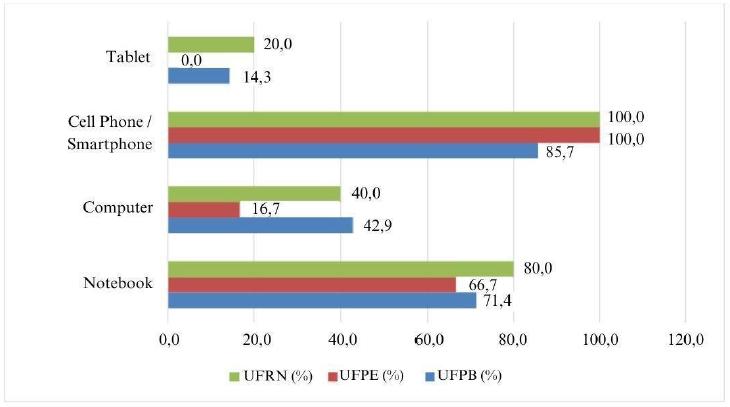
Figure 7
Main Devices Used to Access Digital Information
Source: Resource data.
The practicality of smartphones, which are always at hand and accompany daily routines, makes them a preferred choice over devices such as notebooks or desktop computers, which require more specific use and depend on a larger physical structure. Next, Figure 8 presents data regarding the accessibility of digital environments, which was evaluated as fair or poor by a significant portion of users with low vision, especially at UFPB and UFRN. These results demonstrate a clear need for improvements in these systems, pointing to challenges in creating digital environments that fully meet the needs of users, especially those with specific accessibility demands.
Negative ratings indicate that the resources and interfaces of these digital environments do not meet users’ expectations, possibly due to problems such as low visual contrast, unintuitive navigation, lack of descriptions for images, and even the lack of adequate support for assistive technologies, such as screen readers. In view of this, the limitations compromise the usability and autonomy of users with visual impairments or low vision, making it difficult to carry out academic activities efficiently and independently.
Making digital environments accessible is an essential step to promote inclusion and enhance the impact of digital resources in supporting teaching and research. Figure 9 reveals that the Integrated Academic Activities Management System (SIGAA) is the digital environment most used by users, playing a central role in academic management by offering features such as grade tracking and access to teaching materials. It is quite popular for having an accessible and intuitive interface, which facilitates use and maximizes effectiveness in relation to support and academic activities.
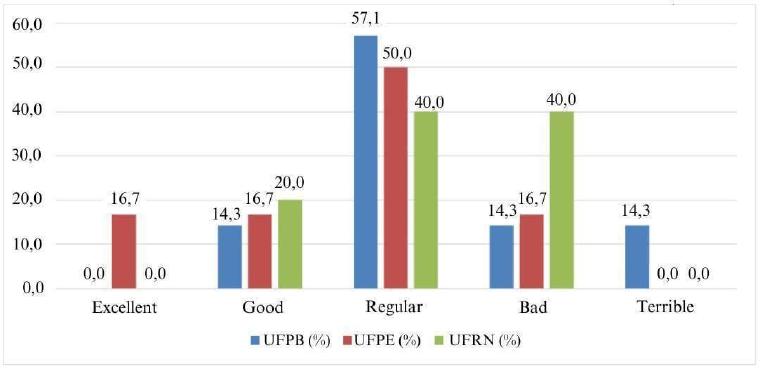
Figure 8
Assessment of the Accessibility of Digital Information Environments
Source: Resource data.
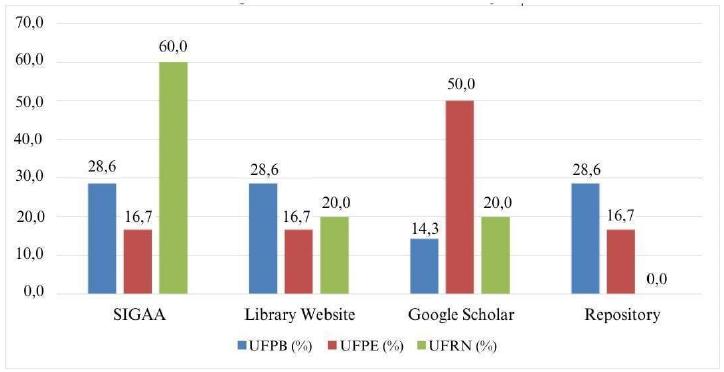
Figure 9
Digital environments are most used in institutions
Source: Resource data.
The library website is also widely accessed and is an essential source for research in institutions, which highlights the need for continuous updates and improvements in user experience. Google Scholar has established itself as a practical and versatile tool for searching for articles and other academic resources, complementing the services offered by institutional platforms. The analysis suggests that by investing in the accessibility, usability and interoperability of these platforms, institutions can promote a more efficient, inclusive digital environment that is aligned with contemporary demands. This will not only facilitate access to information, but also strengthen support for teaching, research and academic management.
Figure 10 addresses the main challenges when accessing digital environments. According to the data below, the lack of accessibility was identified as the main challenge in accessing platforms, which reflects a significant barrier for those who need adapted resources to navigate and interact effectively. The problem is aggravated by confusing layouts, which make it difficult to quickly find information and make the user experience frustrating and inefficient. Users with low vision, for example, may face additional challenges if the structure of websites is not clear and if the elements do not follow a logical and easy-to-understand hierarchy.
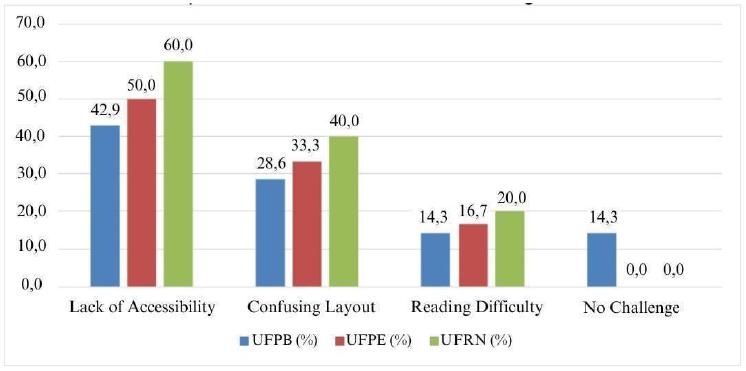
Figure 10
Main challenges when accessing digital environments
Source: Resource data.
Furthermore, reading difficulties, caused by factors such as low contrast and inappropriate font sizes, represent another important obstacle. These problems not only reduce users’ ability to access content, but also affect their independence and productivity in the academic environment.
As shown in Figure 11, screen magnifiers stand out as the most used assistive technology among users, showing that magnifying visual content is a recurring need, especially for people with low vision. This resource is essential for these users to be able to read and interact effectively with digital interfaces. On the other hand, the less frequent use of screen readers and high contrast settings suggests that these resources, although available, may not be widely perceived as indispensable by most users. Alternatively, this low adoption may reflect functional limitations of these tools, which discourages their use.
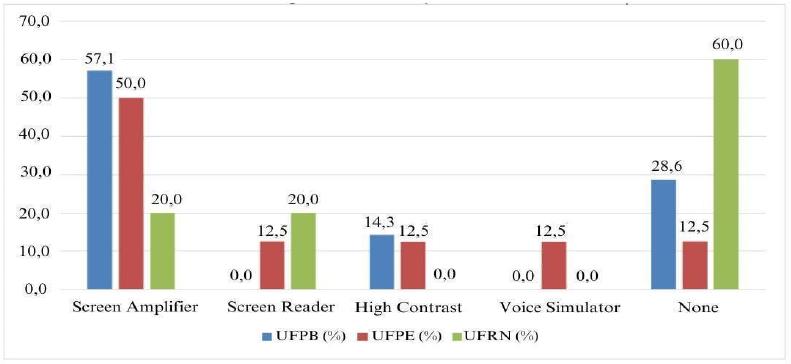
Figure 11
Use of Assistive Technologies to Facilitate Access
Source: Resource data.
This scenario reinforces the need for greater dissemination and guidance on available assistive technologies, combined with improvements in their functionality and accessibility. Figure 12 demonstrates the influence of assistive technologies on access experience. The data reveal that assistive technologies are widely recognized as essential tools for improving the experience of accessing digital environments, especially for users with specific needs, such as people with low vision.
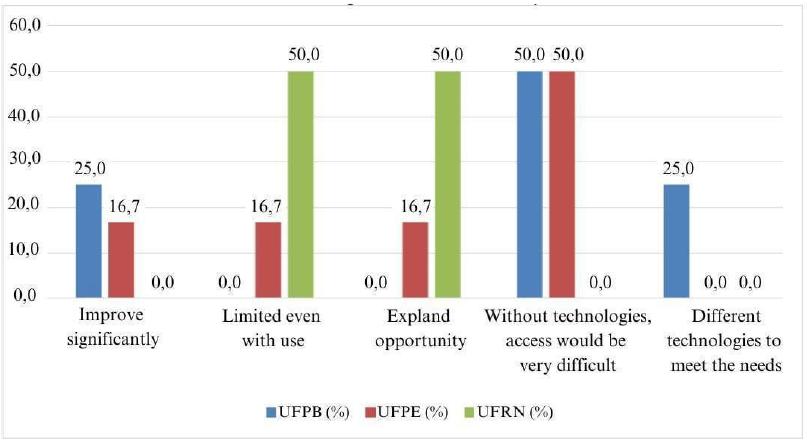
Figure 12
Influence of Assistive Technologies on Access Experience
Source: Resource data.
Some features, such as screen magnifiers, text readers and high contrast settings, play a key role in enabling users to interact more independently and effectively, facilitating access to information and features that might otherwise be inaccessible. Despite the advances represented by these technologies, there is significant room for improvements to make the access experience more intuitive and inclusive. This includes developing more adaptable and customizable tools that can meet the diverse needs of users, ensuring that no group is excluded.
The quality of accessible content in digital environments is evaluated in a mixed way by users, with the majority classifying it as fair or good. The results shown in Figure 13 demonstrate that a significant portion still gives poor evaluations, especially among users at UFPB and UFRN. These results suggest that, although there are efforts to make accessible content available, they are still insufficient to provide high-quality and efficient experience for all users.
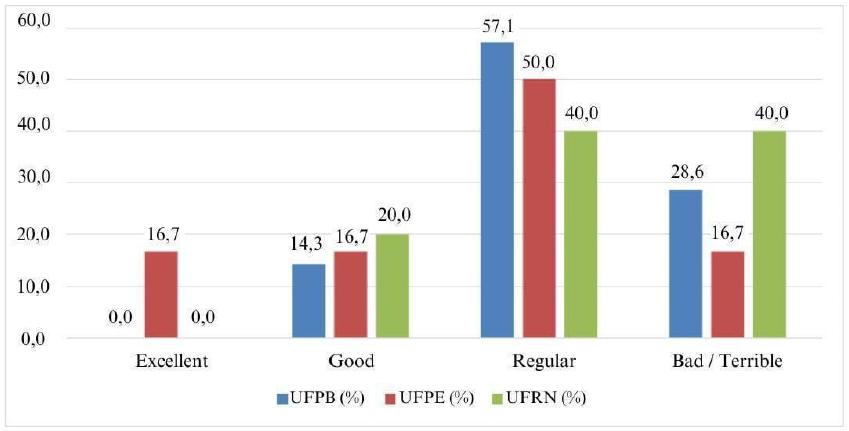
Figure 13
Assessment of the quality of accessible content available
Source: Resource data.
Negative evaluations indicate that some accessible content faces problems such as lack of clarity, navigation difficulties and unsuitability for the use of assistive technologies. In short, these limitations restrict full access to information and compromise the autonomy of users, especially those with specific accessibility needs. Figure 14 presents the main suggestions for improving accessibility in digital information environments. Among the most prominent recommendations are adjustments to fonts and text sizes, improvements in contrast and colors, and the implementation of screen readers. These proposals reflect a clear demand for resources that offer greater customization and adaptability, allowing users to adjust interfaces to their specific visual needs.
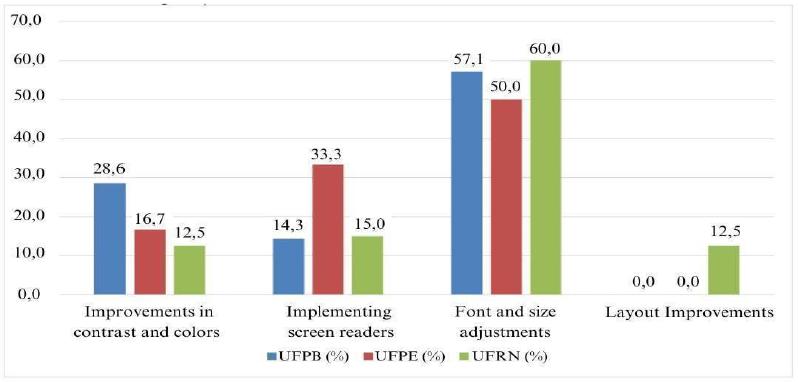
Figure 14
Suggestions for accessibility in digital information environments
Source: Resource data.
These suggestions point to the need to go beyond a basic accessibility design, investing in solutions that offer customization options aligned with users’ individual preferences and capabilities. Regarding institutional awareness of accessibility needs in Figure 15, the predominant argument is that institutions have only partial awareness of accessibility needs in digital environments.
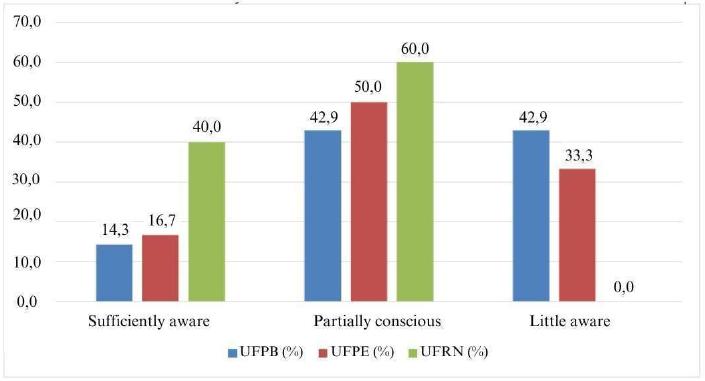
Figure 15
Institutional awareness of accessibility needs
Source: Resource data.
There is a significant division of opinion among users, with many considering this awareness to be insufficient. Insufficient institutional awareness can be reflected in the absence of clear policies, the lack of targeted training, the development of accessible resources, and the lack of regular assessments of the user experience. This neglect limits the reach of accessibility initiatives and creates unnecessary barriers, making it difficult for users to use digital environments independently and effectively.
Regarding the progress of institutions in improving accessibility, Figure 16 reveals a predominantly negative general perception. Most respondents consider progress to be slow or practically non-existent, reflecting a growing frustration among users, who expect more agile and substantial changes in accessibility resources.
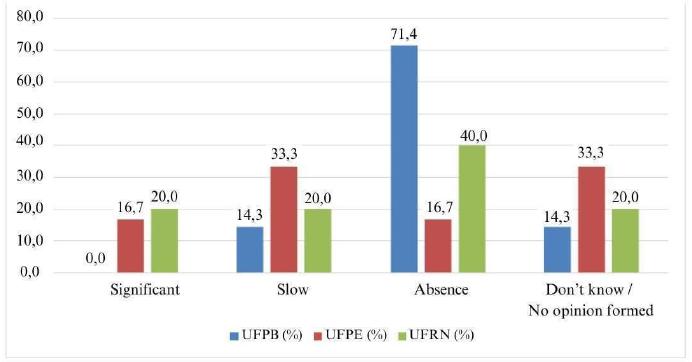
Figure 16
Progress of institutions in improving accessibility
Source: Resource data.
This perception of stagnation suggests that, despite recurring demands and recommendations, institutions have implemented few improvements, which harms the navigation and access experience for users who depend on assistive technologies and specific adjustments to interact with digital environments. The progress observed at UFRN can serve as an example for other institutions, highlighting the importance of a continuous commitment and a systematic approach to promoting accessibility. This division of perceptions reveals that accessibility still does not occupy a priority place in many institutions, reinforcing the need for more solid policies and investments.
Figure 17 addresses suggestions for increasing the promotion of digital accessibility, among the suggestions include the implementation of clear and well-defined institutional policies, as well as the implementation of regular training for all those involved in the development and maintenance of digital environments
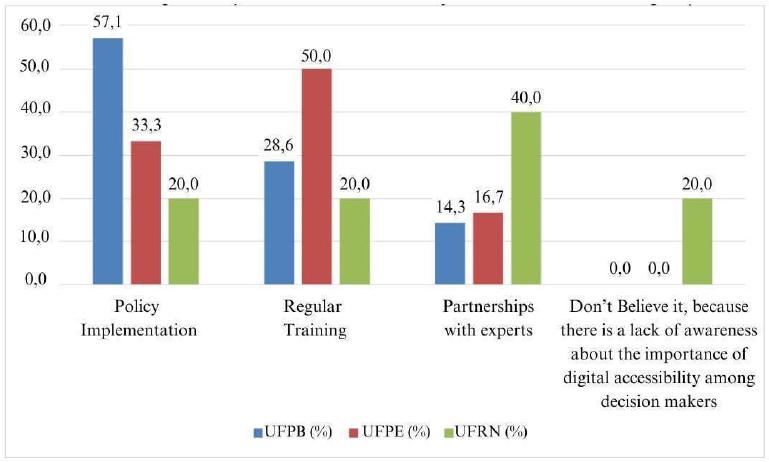
Figure 17
Suggestions for increasing the promotion of digital accessibility
Source: Research data.
In addition, some users highlighted the importance of partnering with accessibility experts who can provide a professional and technical perspective to identify and correct usability barriers.
According to Figure 18, which presents the impact of digital accessibility on educational and/or professional experience, we observe that, although digital accessibility has generated significant advances for some users, providing greater autonomy in accessing materials and information, a significant number of people still face limitations. These difficulties, highlighted by users, negatively impact both the educational and professional experience. In the educational context, the lack of accessible materials can limit learning, delay the completion of tasks and reduce opportunities for equal participation in academic activities.
Similarly, in the professional sphere, the lack of inclusive digital platforms restricts access to information, work tools and training opportunities, hindering the performance and career progression of people with visual impairments or low vision. Ensuring that all users have equal access to knowledge and digital tools is essential to promoting the realization of their educational and professional potential.
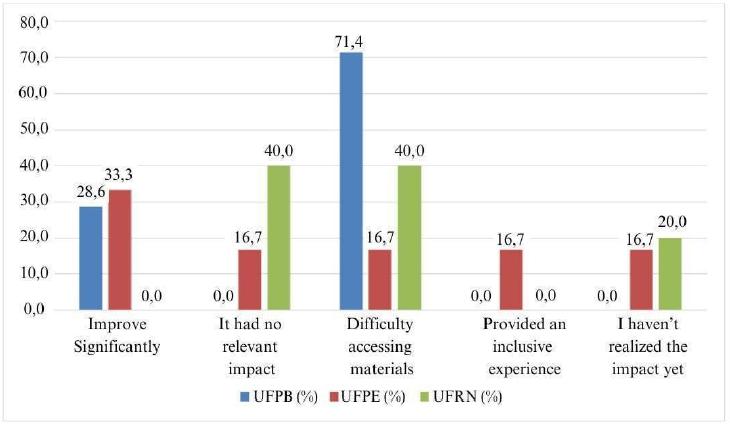
Figure 18
Impact of digital accessibility on the educational/professional experience
Source: Resource data.
The data reinforces the need for continued investment in digital accessibility, as it is not just about eliminating technical barriers, but also about creating a more equitable and inclusive digital environment. The main challenges when interacting with digital environments and online platforms, demonstrated in Figure 19, reveal that small fonts, lack of zoom functionality and confusing layouts are the main challenges faced by users with low vision when interacting with digital environments.
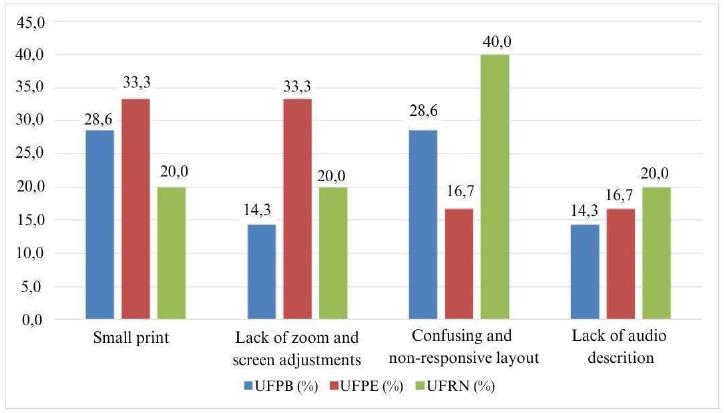
Figure 19
Main challenges when interacting with digital environments
Source: Resource data.
To overcome these limitations, it is essential to adopt universal design principles, such as those recommended by the W3C guidelines, that is, including the use of adjustable fonts, the integration of zoom tools and the creation of clean and well-organized interfaces. In the same way, conducting usability tests with the active participation of users with low vision can help identify and correct problems before launching new platforms or updates.
Figure 20, which presents data on awareness in society about accessibility, reveals that users predominantly evaluate accessibility as poor or terrible. This perception indicates that, despite specific advances in public policies and inclusion initiatives, there is still much to be done for accessibility to be widely recognized and integrated as an essential value in society.
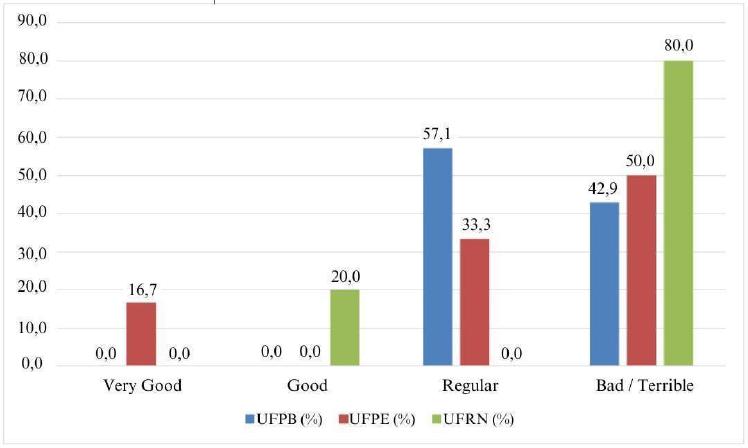
Figure 20
Awareness of accessibility for people with low vision in society
Source: Resource data.
The negative evaluation suggests that the lack of knowledge and awareness about the needs of people with disabilities hinders the implementation of inclusive solutions, both in the digital and physical environments. In the same way, communication must be clear and objective, and the benefits of implementing accessible practices must be highlighted, since these initiatives benefit not only people with disabilities, but also society as a whole.
It is essential to promote structural and cultural changes in order to increase the recognition and integration of accessibility as a social priority. According to figure 21, the suggestions made by users with low vision highlight the need for a more robust educational approach to promote accessibility. Among the main recommendations are the implementation of mandatory courses on accessibility, the incorporation of accessible materials in the subjects and partnerships with specialists for the development of the program.
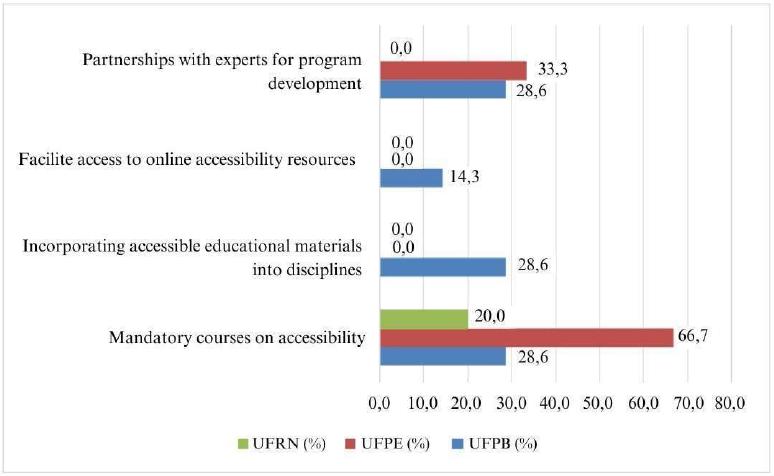
Figure 21
Suggestions for improving accessibility education
Source: Resource data.
The inclusion of mandatory courses on accessibility in curricula would allow future professionals, regardless of their areas of expertise, to acquire a solid understanding of the needs of people with disabilities. This demand would contribute to the development of more inclusive solutions in various sectors.
The lack of accessibility in digital environments generates a profoundly negative emotional impact on users with low vision, causing frequent feelings of frustration, stress and exclusion. Figure 22 highlights these barriers, which not only hinder access to information, but also reinforce the feeling of isolation and inequality, showing that inaccessibility goes beyond a technical problem, directly affecting the well-being and quality of life of these people. Frustration arises from the constant difficulty in performing seemingly simple tasks, such as accessing content, navigating platforms or using essential tools, making the experience exhausting and often demotivating, harming both academic and professional performance.
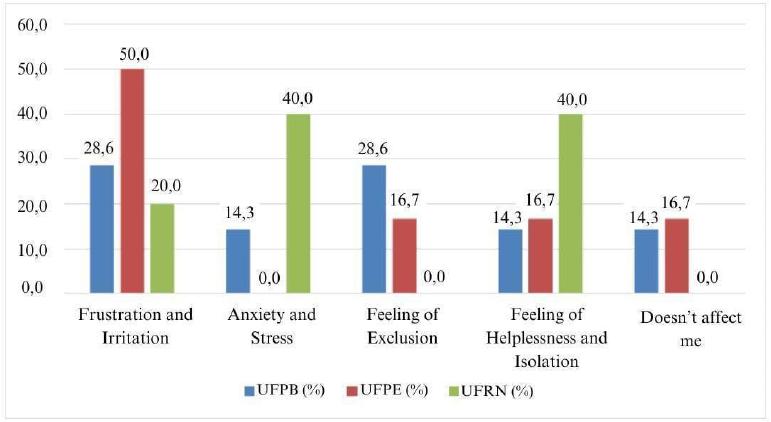
Figure 22
Emotional impact of the lack of accessibility in digital environments
Source: Resource data.
This analysis highlights the urgency of prioritizing accessibility not only as a technical requirement, but as a commitment to inclusion and respect for human dignity. Eliminating these barriers is essential to improving the user experience and combating the negative emotional impacts that limit the full participation of these people in educational, professional and social life. Figure 23 indicates that digital accessibility for people with low vision is widely assessed as fair or poor, highlighting the need for progress in addressing the demands addressed.
The analysis highlights the need for an integrated and continuous approach to improving digital accessibility. This includes developing robust institutional policies, conducting usability testing with real users, and empowering technical teams to design truly inclusive solutions. By prioritizing these changes, institutions can not only meet user expectations but also contribute to building a more just and inclusive society.
As shown in Figure 24, the majority of users with low vision demonstrate positive expectations regarding the future of digital accessibility, technological advances, and the implementation of more inclusive policies.
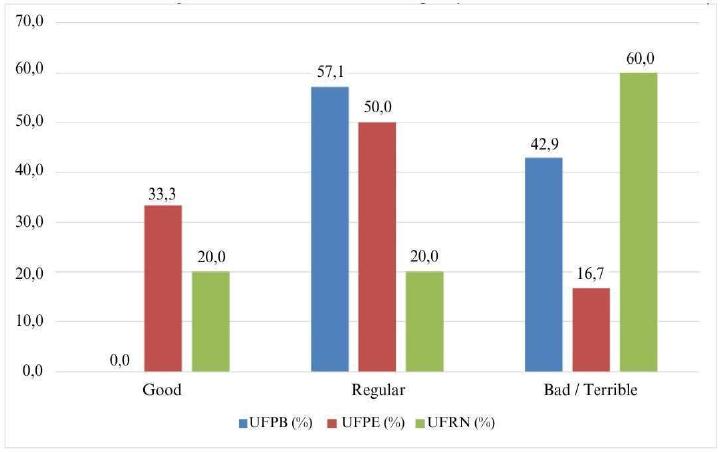
Figure 23
General assessment of digital accessibility for people with low vision
Source: Resource data.
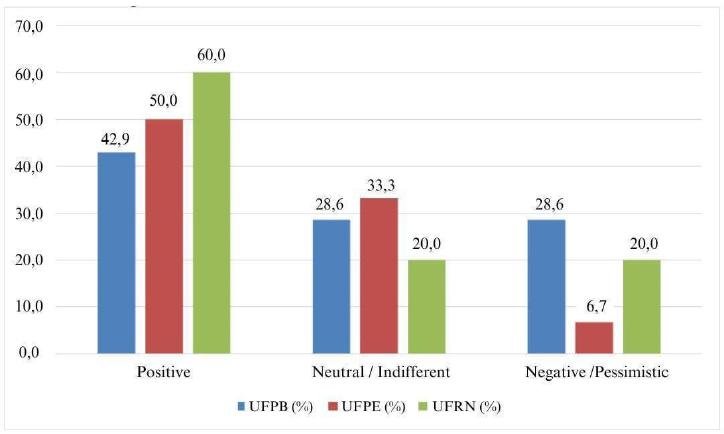
Figure 24
Expectations for the future of accessibility in digital information environments
Source: Resource data.
These divided perceptions point to a central challenge: while some users are confident in the future potential, others remain skeptical about the practical and effective implementation of the necessary changes. Pessimism may be associated with previous experience of slow progress or the perception that institutions are not yet prioritizing accessibility as they should. Transparency in communicating the steps being taken, combined with a long-term institutional commitment, can help convert neutral and pessimistic perceptions into positive perspectives. Figure 25 highlights the suggestions and recommendations of users with low vision to improve digital accessibility, highlighting the priorities identified as screen and font adjustments, which appear as the main recommendation in all institutions.
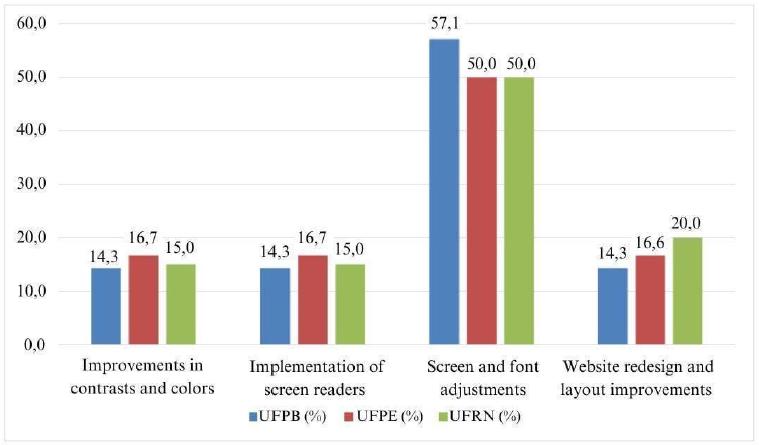
Figure 25
Suggestions to improve accessibility in digital information environments
Source: Resource data.
The analysis highlights the need for specific and integrated actions that meet user demands, prioritizing personalization, visual clarity and navigation efficiency, for which these recommendations are essential to create more inclusive digital environments, capable of meeting the diverse needs of people with low vision and other visual impairments.
6 Final remarks
Throughout this research, it was possible to observe that even with the W3C premises, accessibility in digital information environments still presents several challenges, especially for people with low vision. Despite technological advances and initiatives aimed at digital inclusion, such as the implementation of assistive technologies and accessibility standards, the current scenario still requires significant improvements. The research highlighted the need to improve digital platforms in order to make them more accessible and inclusive, ensuring that all people, especially those with some kind of disability, have access independently.
The results obtained, both with experts and with low vision users, indicate that there is a gap to be filled in the practical application of accessibility guidelines. Many systems still lack simple adjustments, such as improvements in contrast, font adjustments and implementation of screen readers. It is also worth noting that these demands could significantly facilitate the use of these platforms, since digital accessibility is a fundamental right and, for it to be effective, institutions need to adopt ongoing policies and practices.
It is clear that the construction of a theoretical model based on WCAG 2.1 guidelines and the perceptions of experts and users with demonstrated low vision is essential for the advancement of accessibility practices in digital information environments. The involvement of key stakeholders, such as developers, managers and users, is essential for more effective solutions to be developed or even improved.
Finally, it is suggested that studies be conducted with an interdisciplinary approach, involving areas such as design, technology, psychology and social sciences, to explore the interactions between technical, cognitive and cultural aspects in the creation of accessible digital environments. This integrative perspective can lead to more complete and innovative solutions, responding effectively to users’ needs.
Referências
BARDIN, L. Análise de conteúdo. São Paulo: Edições 70, 2011.
BRASIL. Decreto n. 6.949, de 25 de agosto de 2009. Promulga a Convenção Internacional sobre os Direitos das Pessoas com Deficiência e seu Protocolo Facultativo, assinados em Nova York, em 30 de março de 2007. Diário Oficial da União: seção 1, Brasília, ano 146, n. 163, p. 20, ago. 2009.
BRASIL. Lei n. 13.146, de 6 de julho de 2015. Institui a Lei Brasileira de Inclusão da Pessoa com Deficiência (Estatuto da Pessoa com Deficiência). Diário Oficial da União: seção 1, Brasília, ano 152, n. 127, p. 2, 7 jul. 2015.
BRASIL. Ministério da Educação. Portaria n. 555, de 05 junho de 2007. Política Nacional de Educação Especial na perspectiva da Educação Inclusiva. Diário Oficial da União: seção 2, Brasília, ano 144, n. 239, p. 3, 6 jun. 2007.
BRASIL. Portaria n. 142, de 16 de novembro de 2006. Institui o Comitê de Ajudas Técnicas (CAT). Diário Oficial da União: seção 2, Brasília, ano 143. n. 220, p. 3, 17 nov. 2006.
CAMARGO, L. S. A. Metodologia de desenvolvimento de ambientes informacionais digitais a partir dos princípios da arquitetura da informação. 2009. Tese (Doutorado) - Faculdade de Filosofia e Ciências, Universidade Estadual Paulista, Marília, 2009.
COOK, A. M.; POLGAR, J. M. Assistive technologies: principles and practice. 4th ed. St. Louis: Elsevier Health Sciences, 2014.
FUSARI, J. C. Formação contínua de educadores na escola e em outras situações. In: BRUNO, E. B. G., ALMEIDA, L. R., CHRISTOV, L. H. S. O coordenador pedagógico e a formação docente. 2. ed. São Paulo: Loyola, 2001.
GOMES, S. Colocar pessoas com deficiência na invisibilidade é uma forma de liberar a sociedade de sua responsabilidade de ser inclusiva. Câmara Paulista para Inclusão de Pessoa com Deficiência, São Paulo, 2023.
HOTT, D. F. M.; CRUZ-RIASCOS, S. A. Ciência da informação e interações teórico-sistêmicas com a acessibilidade. In: ENCONTRO NACIONAL DE PESQUISA EM CIÊNCIA DA INFORMAÇÃO, 19., 2018, Londrina. Anais [...]. Rio de Janeiro: ANCIB, 2018.
LOURENÇO, E. A. G.; FIDALGO, S. S.; MALHEIRO, C. A. L.; CAMPOS, S. R. L. Acessibilidade para estudantes com deficiência visual: orientações para o ensino superior. São Paulo: Ed. Unifesp, 2020.
MINHA BIBLIOTECA. Streaming de livros digitais. Quem somos. São Paulo: [s. n.], 2024.
OLIVEIRA, C. M. Q. Metodologias de inclusão para alunos com deficiência visual no âmbito escolar. 2017. Trabalho de Conclusão de Curso (Graduação em Educação Física) - Faculdade de Ciências da Educação e Saúde, Centro Universitário de Brasília, 2017.
RESENDE, A. P. C.; VITAL, F. M. P. A convenção sobre os direitos das pessoas com deficiência comentada. Brasília: Coordenadoria Nacional para Integração da Pessoa Portadora de Deficiência, 2008.
UNIVERSIDADE FEDERAL DA PARAÍBA (UFPB). Sistema de bibliotecas. João Pessoa: UFPB, 2024.
UNIVERSIDADE FEDERAL DA PARAÍBA (UFPB). Repositório institucional da UFPB. João Pessoa: UFPB, [2025].
UNIVERSIDADE FEDERAL DE PERNAMBUCO (UFPE). Attena: repositório digital da UFPE. Recife: UFPE, 2019.
UNIVERSIDADE FEDERAL DO RIO GRANDE DO NORTE (UFRN). Repositório institucional da UFRN. Natal: UFRN, c2025.
SONZA, A. P. Ambientes virtuais acessíveis sob a perspectiva de usuários com limitação visual. 2008. Tese (Doutorado em Informática na Educação) - Programa de Pós-Graduação em Informática na Educação, Centro Interdisciplinar de Novas Tecnologias na Educação, Universidade Federal do Rio Grande do Sul, Porto Alegre, 2008.
SASSAKI, R. K. Por que o termo “Tecnologia Assistiva”? [S. l.: s. n.]: 1996.
WORLD WIDE WEB (W3C). Cartilha acessibilidade na web: fascículo III: conhecendo o público-alvo da acessibilidade na web. São Paulo: Comitê Gestor da Internet no Brasil, 2018a.
WORLD WIDE WEB (W3C). Diretrizes de Acessibilidade para Conteúdo Web (WCAG) 2.1: Recomendação W3C de 05 de junho de 2018. São Paulo: Comitê Gestor da Internet no Brasil, 2018b.
Notes
Author notes
Corresponding authorship Maria Luciana de Almeida lucianalmeida.pe@gmail.com